We're moving alumni conversation from the SBAA app over to a new WhatsApp Community we've created. The channels you know and love from the app are all here: Announcements, Jobs, Business Advice, Everything Vendors, Random, Advocacy, and Take a Need / Leave a Need.
This doesn't change how membership, the newsletter, and the rest of our email comms work.
The SBAA app will remain up during the transition, so people can move over to the WhatsApp Community gradually.
This community is intended for Biodesign Innovation Fellowship alumni. During the June 3 SBAA dinner, we're keeping the WhatsApp link available on this page so alumni can join from the room and help with the transition. Please treat this as a dinner/migration link, not a public invite. Once the migration window is complete, we'll remove the public WhatsApp link and make access available by request through an SBAA admin.
FAQ
What happens after I follow the join link?
After you follow the link, you will land in the Community's Announcements area.
From there, choose the individual groups/channels you want to join. WhatsApp does not automatically add you to every group in the Community, so the first time you join, open the Community and manually join the groups that are useful to you.
What about privacy?
This community lives on WhatsApp, which is run by Meta, not SBAA.
In the main Community / Announcements area, regular members generally do not see everyone's full phone number. Admins may see more detail, and anyone who already has you saved as a contact may recognize you.
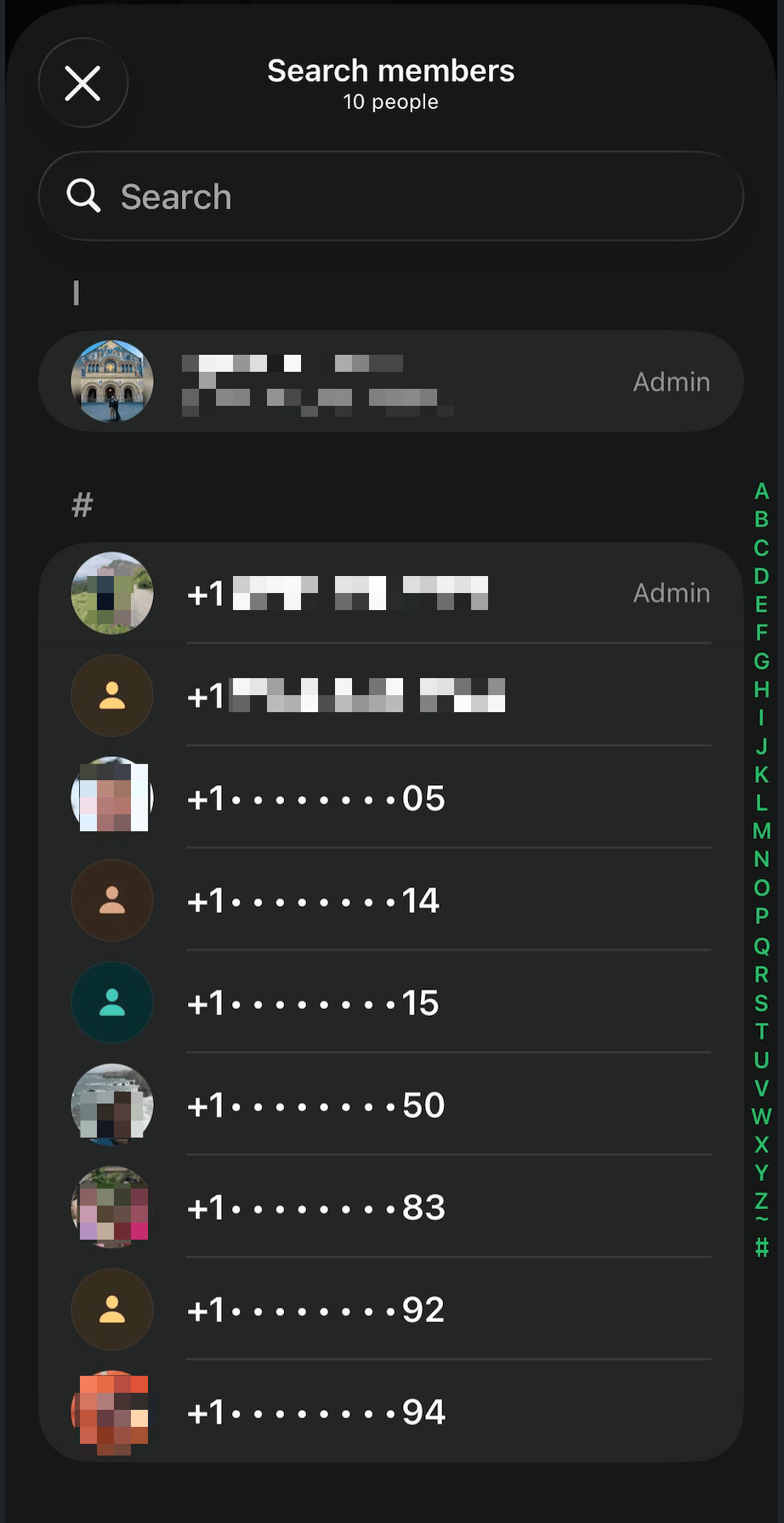
Once you join an individual group/channel, people in that same group may see your profile photo and see you in the member list. Your phone number and WhatsApp name are generally only fully visible to people who already have you saved as a contact, or after you talk in that shared group/channel. Otherwise, WhatsApp may show your number partially hidden, like in the example.
Example of how WhatsApp may partially hide numbers in the member list.
Do I automatically join all the channels?
No. After you enter the WhatsApp Community, WhatsApp does not automatically add you to every channel/group. The first time you join, open the Community and manually join the individual channels/groups you are interested in.
Will new members see old messages?
No. WhatsApp does not show messages from before you joined a group. That is another reason to join early: you will be able to see the intros, questions, answers as they happen, instead of missing the early activity.
As always, people can screenshot or forward messages, so please treat anything you post as visible to the broader alumni community unless in a private message.
Can I choose what I participate in?
Yes. Join the channels/groups that are useful to you, mute the ones you do not want alerts from, and leave any group anytime.
Join during the SBAA dinner
Opening this page on a computer? Scan this QR code with your phone to open the WhatsApp link.
Open WhatsApp link
Questions? Please reach out to the SBAA Board.
Join the SBAA WhatsApp Community
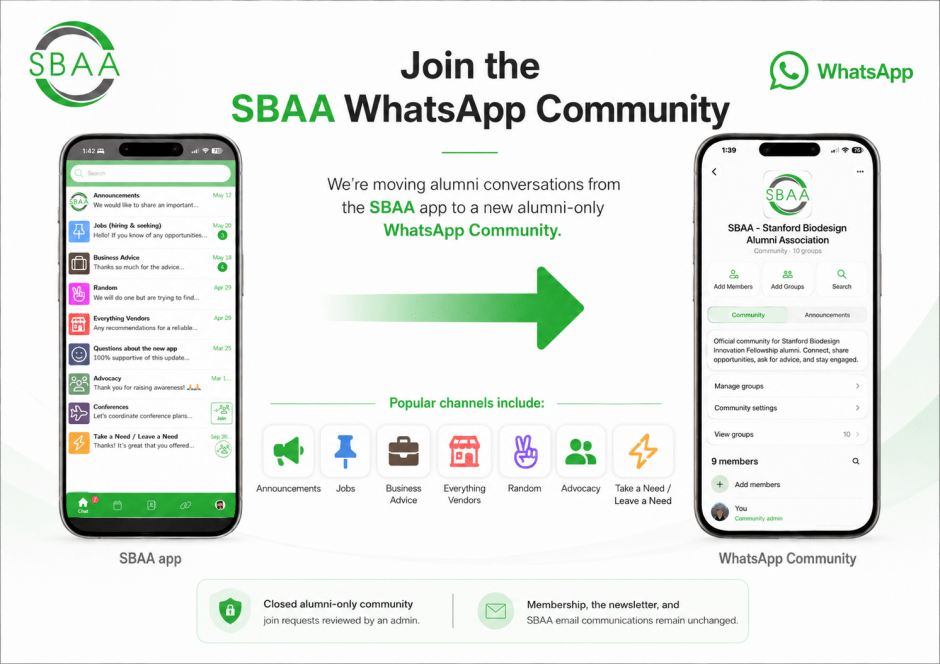
We’re moving alumni conversation from the SBAA app over to a new WhatsApp Community we’ve created. The channels you know and love from the app are all here: Announcements, Jobs, Business Advice, Everything Vendors, Random, Advocacy, and Take a Need / Leave a Need.
This doesn’t change how membership, the newsletter, and the rest of our email comms work.
The SBAA app will remain up during the transition, so people can move over to the WhatsApp Community gradually.
This community is intended for Biodesign Innovation Fellowship alumni. During the June 3 SBAA dinner, we’re keeping the WhatsApp link available on this page so alumni can join from the room and help with the transition. Please treat this as a dinner/migration link, not a public invite. Once the migration window is complete, we’ll remove the public WhatsApp link and make access available by request through an SBAA admin.
FAQ
What happens after I follow the join link?
After you follow the link, you will land in the Community’s Announcements area.
From there, choose the individual groups/channels you want to join. WhatsApp does not automatically add you to every group in the Community, so the first time you join, open the Community and manually join the groups that are useful to you.
What about privacy?
This community lives on WhatsApp, which is run by Meta, not SBAA.
In the main Community / Announcements area, regular members generally do not see everyone’s full phone number. Admins may see more detail, and anyone who already has you saved as a contact may recognize you.
Once you join an individual group/channel, people in that same group may see your profile photo and see you in the member list. Your phone number and WhatsApp name are generally only fully visible to people who already have you saved as a contact, or after you talk in that shared group/channel. Otherwise, WhatsApp may show your number partially hidden, like in the example.
Do I automatically join all the channels?
No. After you enter the WhatsApp Community, WhatsApp does not automatically add you to every channel/group. The first time you join, open the Community and manually join the individual channels/groups you are interested in.
Will new members see old messages?
No. WhatsApp does not show messages from before you joined a group. That is another reason to join early: you will be able to see the intros, questions, answers as they happen, instead of missing the early activity.
As always, people can screenshot or forward messages, so please treat anything you post as visible to the broader alumni community unless in a private message.
Can I choose what I participate in?
Yes. Join the channels/groups that are useful to you, mute the ones you do not want alerts from, and leave any group anytime.
Join during the SBAA dinner
Opening this page on a computer? Scan this QR code with your phone to open the WhatsApp link.

Questions? Please reach out to the SBAA Board.

